Built by a subcontractor PM
Your GC uses Procore.
You use a spreadsheet.
There's a better way.
One system, office to field. And the field is free.
Your office runs the schedule of values and draws, change orders, job costing, and T&M tags priced off your own rate lists. Your crews clock in and log the day — field users and invited subs are free and unlimited.
14-day free trial, no card needed.
$249/mo after · field crews free · See what's included → See how it works ↓
Pick your trade. SubMark is already set up for it.
SubMark ships a setup pack for 29 commercial trades — the phase names your foremen use, the checklists that belong to each phase, your material lists, and a schedule-of-values breakdown shaped like your kind of contract. Loaded the moment you pick your trade at setup, editable in Settings after.
Mechanical, Electrical & Plumbing
Structure & Site
Envelope & Exterior
Interior Finishes
- Drywall
- Acoustical Ceilings (ACT)
- Painting
- Flooring
- Tile & Stone
- Trim / Finish Carpentry
- Cabinetry / Millwork
- Countertops
- Doors / Frames / Hardware
Other
- Fireproofing † — generic setup, no pack of its own yet
- Other / Custom
Fireproofing starts from the generic setup — it has no pack of its own yet.
The problem
Sound familiar?
The overrun reaches the office a month after the crew worked it.
The hours are on a timesheet in somebody's truck and the extra work is in a foreman's phone. By the time the office adds it up, the job has already spent the money.
Your draws are scattered across every GC's portal.
Procore for one job, GCPay for the next, Textura for the third. Nobody can say what's billed, what's certified, and how much retainage is still out without logging into all of them.
Scheduling 40 workers across 8 jobs runs on phone calls.
Someone always ends up somewhere they're not supposed to be — because there's no single place to see all your crew assignments at once.
Everything in one place
Built around how subcontractors
actually run jobs.
Not a generic construction tool bolted together for subs. Every feature was designed around the subcontractor workflow from day one — the office side and the field side, in the same system.
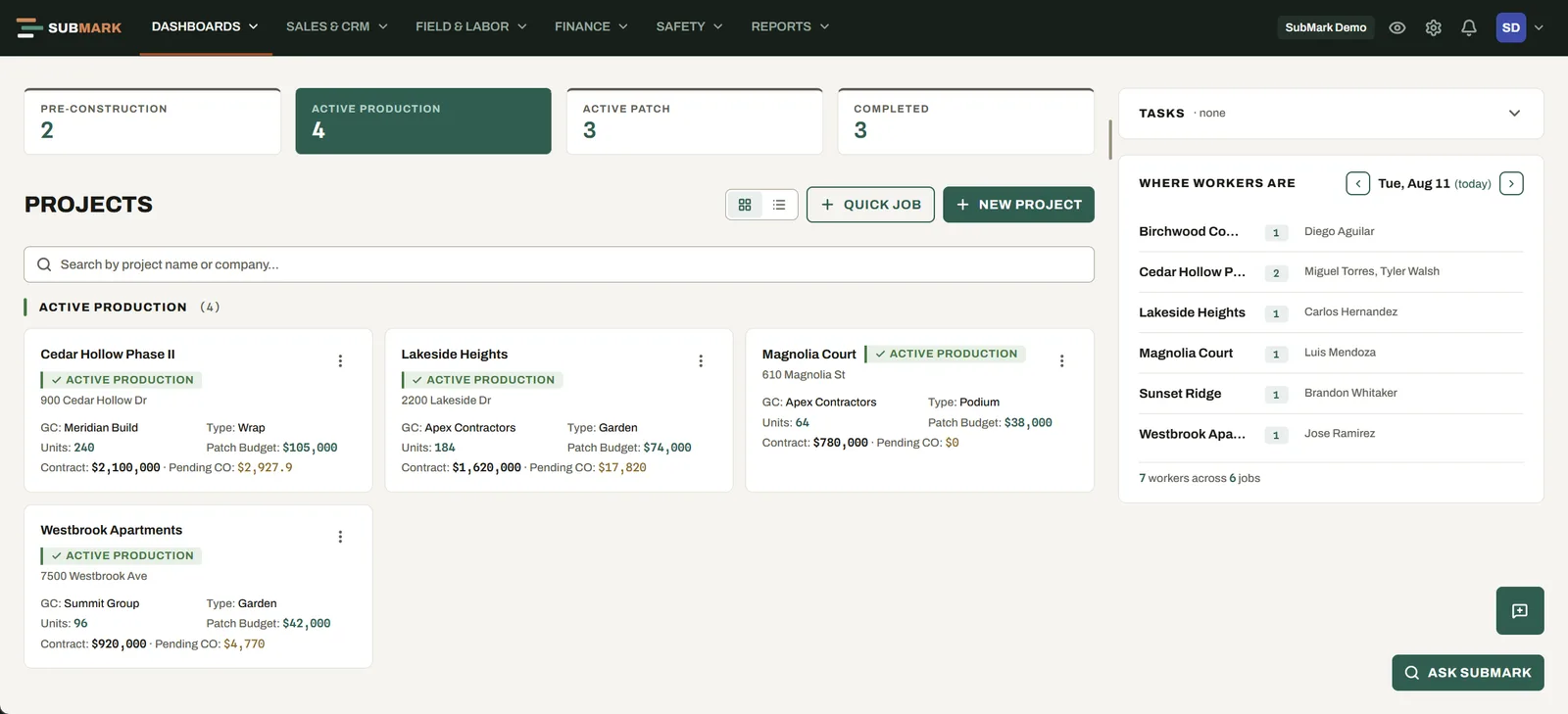
JOB DASHBOARD
Your whole company on one screen.
Every active job with its GC, contract value and pending change orders visible at a glance. Pre-construction through completed — nothing hiding in a spreadsheet.
PLANS & TAKEOFF
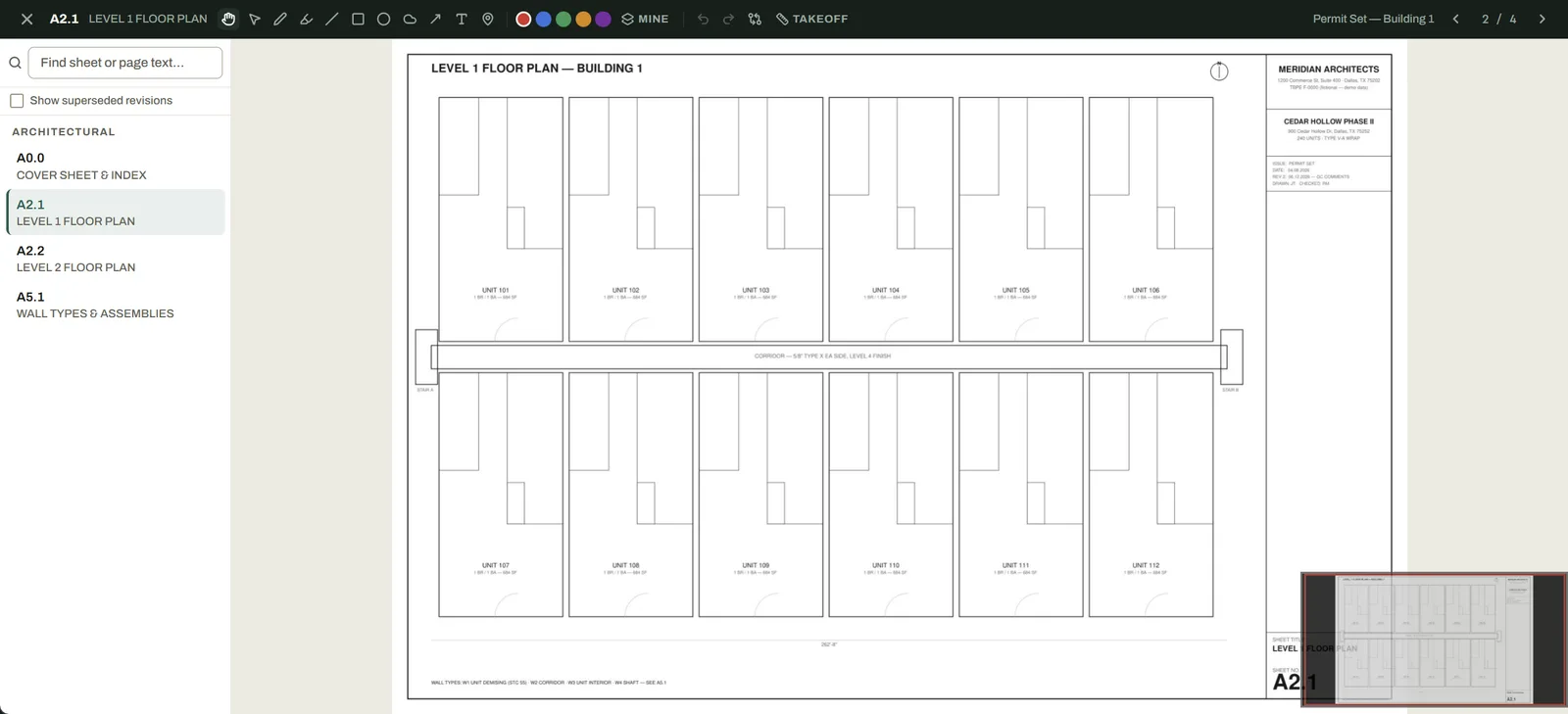
Upload the set. SubMark reads the sheets.
Drop in a full drawing set and AI reads every title block — sheet numbers and names filled in automatically, no renaming 60 pages by hand. Then measure and count directly on the sheets: markups stay put, and takeoff quantities flow straight into your estimate and proposal.
JOB COSTING
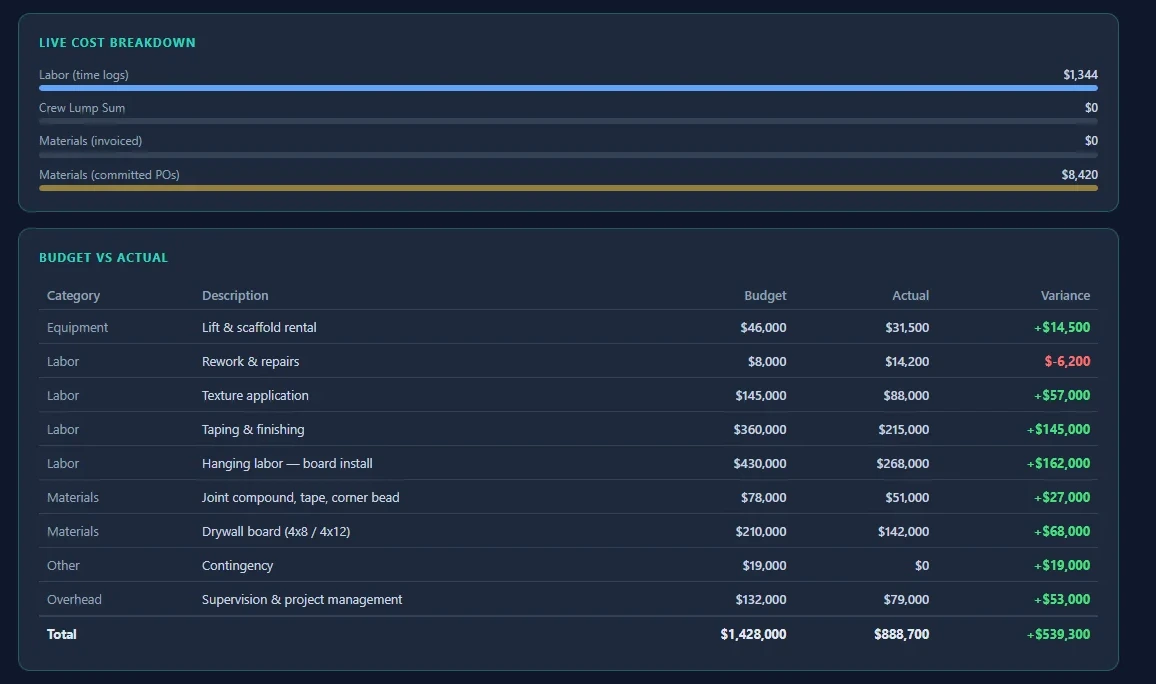
See the overrun while the job can still absorb it.
Labor hours, supplier invoices, purchase orders and subcontractor costs land against your original budget per job and per phase, as the hours get logged and the costs get coded. Connect QuickBooks and bills and purchases pull into job costing automatically every hour once auto-pull is on, so your cost picture isn't waiting on month-end.
SOV & DRAWS
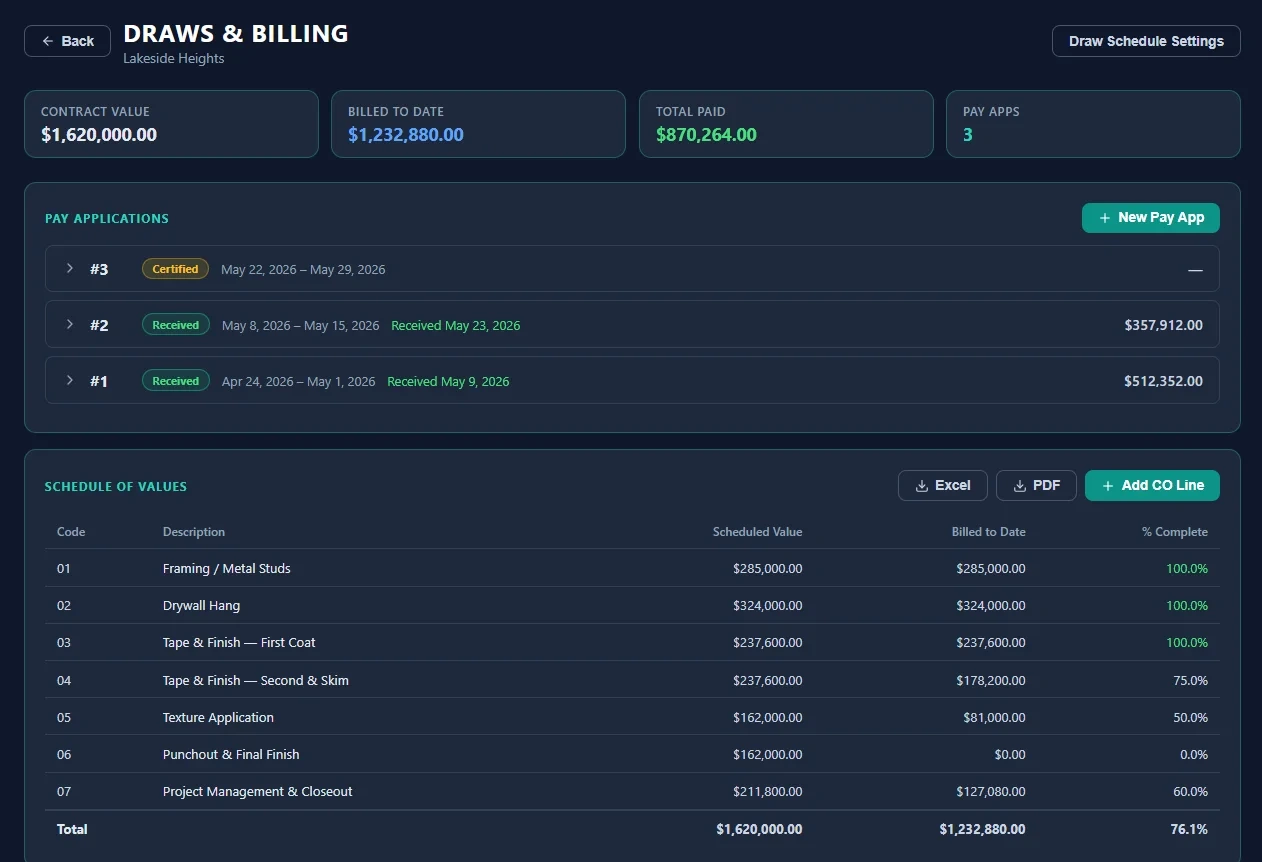
Every draw tracked, wherever your GC makes you submit it.
Build your schedule of values in SubMark; it locks when the first draw goes out, and approved change orders are added to it automatically. Whatever portal or form the GC makes you submit through, log the draw here — then see billed to date, retainage held and when the check landed, across every job and every GC.
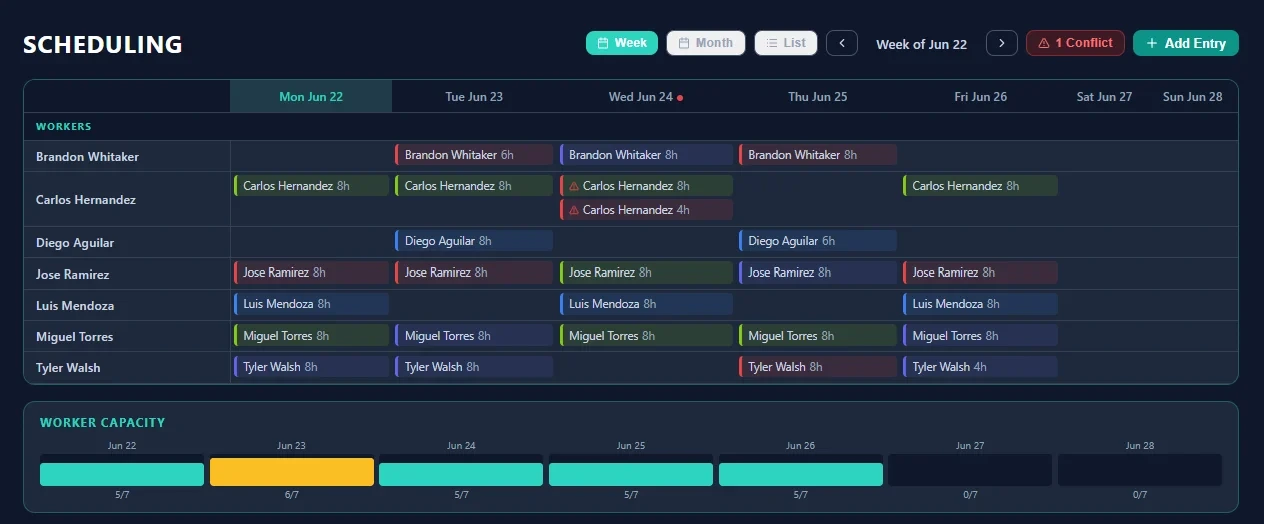
CREW SCHEDULING
Stop double-booking your best crew.
A cross-project calendar that shows every worker's assignments across all active jobs. SubMark flags scheduling conflicts automatically and lets you drag to reschedule.
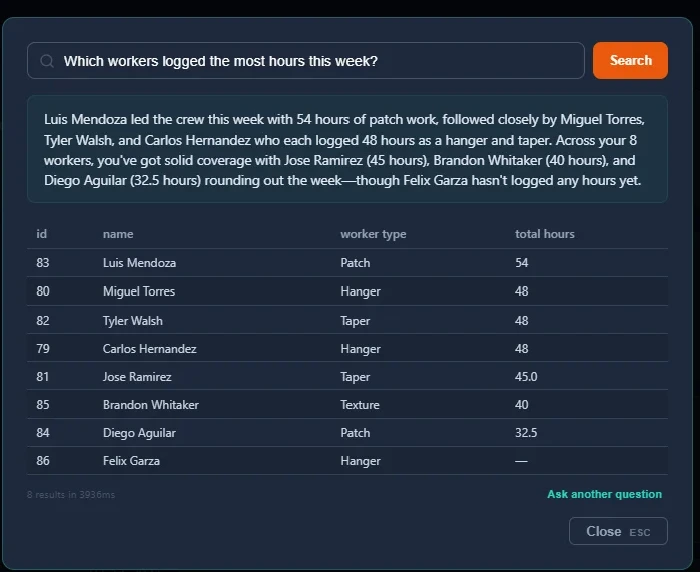
ASK SUBMARK
Ask anything. Get answers from your own data.
Type a question in plain English — "Which jobs have labor over budget this month?" or "Show me open change orders for Summit Group jobs" — and SubMark searches your live data and responds instantly.
Your whole company on one screen.
Every active job with its GC, contract value and pending change orders visible at a glance. Pre-construction through completed — nothing hiding in a spreadsheet.
Upload the set. SubMark reads the sheets.
Drop in a full drawing set and AI reads every title block — sheet numbers and names filled in automatically, no renaming 60 pages by hand. Then measure and count directly on the sheets: markups stay put, and takeoff quantities flow straight into your estimate and proposal.
See the overrun while the job can still absorb it.
Labor hours, supplier invoices, purchase orders and subcontractor costs land against your original budget per job and per phase, as the hours get logged and the costs get coded. Connect QuickBooks and bills and purchases pull into job costing automatically every hour once auto-pull is on, so your cost picture isn't waiting on month-end.
Every draw tracked, wherever your GC makes you submit it.
Build your schedule of values in SubMark; it locks when the first draw goes out, and approved change orders are added to it automatically. Whatever portal or form the GC makes you submit through, log the draw here — then see billed to date, retainage held and when the check landed, across every job and every GC.
Stop double-booking your best crew.
A cross-project calendar that shows every worker's assignments across all active jobs. SubMark flags scheduling conflicts automatically and lets you drag to reschedule.
Ask anything. Get answers from your own data.
Type a question in plain English — "Which jobs have labor over budget this month?" or "Show me open change orders for Summit Group jobs" — and SubMark searches your live data and responds instantly.
Real product, real data
See the margin while the job is still running.
Labor hours, supplier invoices and purchase orders land against your own budget, line by line, as the hours get logged and the costs get coded. Budget, actual and variance on every line — not a number you back into after the last draw.
Actual screenshot from a SubMark workspace — want to click around it yourself? Start a free trial or
Plays well with your stack
Connected to the tools you already run on.
SubMark runs your jobs — it doesn't ask you to abandon everything else. Keep your accounting, your website, and your team tools in the loop automatically.
Connect your company once. Bills and purchases flow into job costing on their own, and you send draws and POs to QuickBooks with a click — no exports, no re-keying, no bookkeeper cleanup at month end.
- Connect from Settings → Integrations in a couple of minutes
- Secure OAuth when you connect — SubMark never sees your QuickBooks password
- Bills and purchases pull into job costing on their own, hourly if you turn it on
- Send draws (as invoices) and POs to QuickBooks with a click, and a coverage meter shows how much of your QuickBooks cost is coded to a job
Zapier links SubMark to the rest of your stack — your website, your spreadsheets, your team chat — with no code and no developer.
- Website form fills become leads on your SubMark pipeline automatically
- New projects and change orders can post to Slack, email, or Google Sheets the moment they’re created
- Simple API keys your admin creates in Settings — revoke any time
More integrations are on the roadmap. Tell us what your stack needs →
"I built SubMark because I was the PM who needed it. Managing multiple jobs meant living in spreadsheets, re-keying the same draw numbers into a different GC portal every month, and finding out about a labor overrun long after the crew had worked the hours. Every subcontractor I've talked to has the same story."
Built by a subcontractor PM
Stop duct-taping tools together.
One system for the office and the field: schedule of values and draw tracking, change orders, T&M tags and job costing, in the same place your crews clock in and log the day. Field users and invited subs are free and unlimited.
14-day free trial, no card needed. Set up your company and your first job yourself — or ask for a walkthrough and we'll do it with you.