For fire alarm & security subcontractors
Fire alarm contractor software built for the back end of the job.
Search “fire alarm software” and you get monitoring platforms and service dispatch. You are not dispatching service calls. You are rough-in, wire pull, devices, programming and an acceptance test — and a quarter of your contract sits behind a test date somebody else sets. SubMark is built for that job, bid to final retainage, with the office and the field in one system.
14-day free trial, no card needed. Sign up from here and fire-alarm is already selected when you pick your trade. See pricing →
- Retests logged and priced the day you are turned away
- Programming and commissioning as their own SOV lines
- Every GC’s draw deadline in one calendar
What actually goes wrong on a commercial fire alarm job.
Your money is all at the back.
Material and rough-in are front-loaded cost. The panel, the programming, your pretest, the AHJ acceptance test and commissioning are the last quarter of the contract, and they happen when the building is ready rather than when you are. On one SOV line that quarter is a lump a GC calls punch and holds for a quarter of a year. On separate lines, each piece gets certified and paid as it happens.
You get retested for somebody else’s mistake.
A drywall crew covered a smoke. The HVAC shutdown was not wired. Elevator recall was never scheduled. You mobilize, you cannot test, you come back. Every one of those trips is billable and almost none of them get billed. The fix is a change event with photos the day you are turned away and a T&M tag signed on site — and being straight about the limit: nothing in SubMark ties a draw to an inspection result. What you have is a dated record and a signed tag, which is what the conversation runs on.
The device count moves all year.
Every life-safety revision adds strobes, horns and duct detectors. An occupancy change adds devices. The fire marshal asks for two more pull stations at the walk. Each one is scope you perform before any change order exists, and the field is the only place it can be captured — a change event with photos the day it happens, then a priced tag signed before anyone leaves.
One programmer, six jobs, one acceptance date.
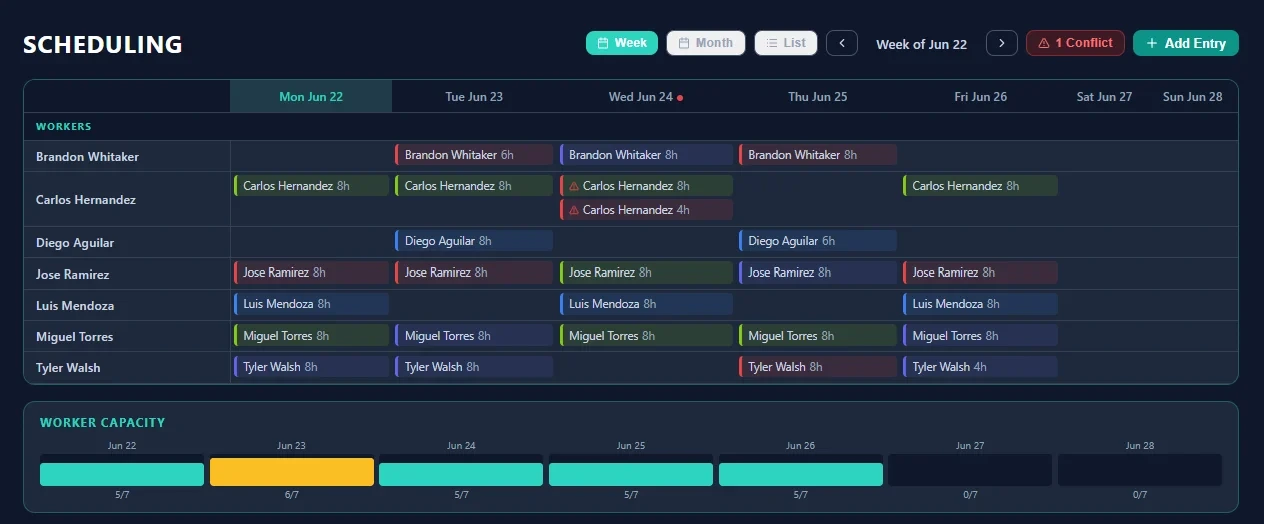
Programming is one person. If that person is on the wrong job on acceptance day, the whole building waits and the GC’s delay becomes yours. SubMark schedules every worker across every job in one calendar, flags the conflict before the week starts, and shows you on one screen who is on which job today.
Before you mobilize
The 4 things fire-alarm subs settle with the GC before mobilizing.
What is approved, where your scope stops, what has to be true before you start, and how you get at the work. Every one of them turns into a change order three weeks in if nobody writes the answer down — and the answer is worth nothing if it only lives in one PM’s inbox.
In the pack
Switch on Pre-Construction Review and these 4 questions are already the list, worded the way fire-alarm subs ask them.
- Confirm the approved device layout and the permit-stamped drawings
- Confirm where our scope stops with electrical on conduit and power
- Confirm the interface points with HVAC, elevator and sprinkler
- Confirm the AHJ test, inspection and sign-off sequence
Tick them off job by job, with your own note on each. The note is your answer — the pack ships the question and leaves the answer to you.
Pre-Construction Review is an opt-in module — it is not one of the eight switched on at setup. Turn it on in Settings and the list is already there in fire-alarm terms, with no upgrade and no setup call. Edit it once and it applies to every job; the tick and the note stay with the job it was asked on. See every module →
The fire alarm job, permit to commissioning.
Rough-in is the cheap part and the back end is where the contract lives. Here is how the work maps to what ships in SubMark.
- 01 Bid & estimate
Device takeoff off the life-safety sheets, panel and power-supply sizing, interface scope, conduit allowance and alternates.
Bid Board, Plans & Drawings, Takeoff, Estimating & Proposals
- 02 Permit & shop drawings
Stamped shop drawings, battery and voltage-drop calculations, and plan review before anything gets installed.
Submittals with a material library, cover sheets and merged PDF export
- 03 Rough-in
Conduit, boxes, sleeves and back boxes in the walls and above the grid, on whatever scope line you drew with the electrician.
Daily Labor Logs with photos, Change Events
- 04 Wire pull
Initiating and notification circuits pulled, home runs back to the panel, every circuit labeled.
Time Clock & Labor Logs feeding Job Costing
- 05 Device install
Smokes, heats, duct detectors and pull stations hung and addressed; horns, strobes and speakers hung on their circuits.
Purchase Orders, Invoices Inbox tying supplier cost to the job
- 06 Panel & programming
Panel set, power supplies landed, addresses and messages programmed, graphics built.
Crew Scheduling across jobs, Where Workers Are
- 07 Interfaces
Elevator recall, HVAC shutdown, door holds, dampers, and the sprinkler trade’s flow and tamper switches.
Change Events for the interface that was never ready
- 08 Pretest & acceptance
Your own pretest, then the AHJ and the fire marshal, device by device, floor by floor.
Daily Labor Logs as the dated record, T&M Tags for the retest
- 09 Commissioning & closeout
Record drawings, O&M, the certificate, owner training, final billing and the retainage.
Schedule of Values & Draw Log, Lien Waiver Tracking, Submittals for the closeout package
Every module named above ships today; the eight below are on from day one, and the rest are a switch in Settings, not an upgrade. The full list is on the product page.
In the pack
These 7 phases load with the Fire alarm pack the moment you pick it at setup.
They are the phase list your foremen pick from on every daily log, so the hours come back tagged to the part of the job they were spent on.
- 01 Permit / Shop
- 02 Rough-In
- 03 Wire Pull
- 04 Device Install
- 05 Panel / Programming
- 06 Test / Inspection
- 07 Commission
Rename, reorder or delete any of them in Settings — the pack is a starting point, not a cage.
A fire alarm schedule of values that does not hide the last quarter.
The back end of a fire alarm contract is the part a GC most wants to call punch. Give it lines of its own and it becomes work with a value instead of a withheld percentage:
In the pack
Open the SOV builder on a new job and these 5 lines are already in it.
- Material 30%
- Rough-In 25%
- Devices 20%
- Panel / Program 15%
- Test / Commission 10%
What most commercial fire-alarm subs add
- 01 Permits, shop drawings & calculations
- 02 Rough-in — conduit & boxes
- 03 Fire alarm cable — material stored-material line
- 04 Wire pull — labor
- 05 Initiating devices — material
- 06 Notification devices — material
- 07 Device install — labor
- 08 Control panel & power supplies stored-material line
- 09 Panel install & programming
- 10 Interfaces — elevator, HVAC & dampers
- 11 Pretest
- 12 Acceptance test & commissioning
- 13 Record drawings, O&M & owner training
Programming, pretest and acceptance are three separate weeks of work done by three different people. On one line they are a number a GC holds. On three lines each one gets certified and paid as it is finished.
That longer list is an illustration, not a template — your SOV is negotiated with your GC. SubMark gives you the SOV to build, and tracks every draw, retainage amount and payment against it. It is your record of the job, not a replacement for the GC’s billing system — you submit the draw the way each GC requires and log it here.
Read next
Schedule of values for subcontractors: how to build one that bills clean
How to break out line items so programming, pretest and acceptance each carry their own money — and why a single “fire alarm” line puts a quarter of your contract behind the GC’s punch list.
T&M tickets in commercial construction: getting signed, and getting paid
A retest because a device was covered is a T&M tag priced off your rate list and e-signed on site, not a phone call three weeks later — what belongs on the ticket and how a month of tags becomes one change order.
Inside SubMark
One calendar for every crew on every job.
One programmer, three technicians and an acceptance test on Thursday. SubMark schedules every worker across every job in one calendar and flags the conflict before the fire marshal shows up.
On from day one, in every trade’s setup.
Nothing is paywalled by tier. These eight are switched on in every one of the 29 trade packs, fire-alarm included, from the moment you finish setup.
T&M Tags
Field tickets priced off your own rate lists and signed by the GC on the spot.
Change Events
The field logs a scope change with photos the day it happens, then it converts to a CO.
Draw Calendar
Every GC’s billing cutoff and submission method in one calendar, with reminders.
Submittals
Submittal packages with a material library, cover sheets and merged PDF export.
Daily Labor Logs
Weather, narrative, labor, materials and photos, with a submit-and-review workflow.
Timesheets
Weekly rollups with worker signatures and supervisor approval, plus a payroll summary export.
Where Workers Are
A live view of which workers are on which job today.
Safety
Toolbox talks, inspections, incidents, and certification and COI tracking with expiry dates.
Pick Fire Alarm / Security at setup and SubMark loads the fire alarm pack: the real phase list from permit and shop drawings through rough-in, wire pull, device install, panel and programming, test and inspection, and commissioning; worker types for foremen, technicians, programmers and apprentices; a material list built around fire alarm cable, detectors, pull stations, notification devices, control panels, conduit and boxes, and cameras and access control; and test and commissioning on the phase checklist. Anything the pack gets wrong, you change in Settings.
The worker types are already there too — Foreman, Technician, Programmer and Apprentice — on every worker record and on every daily labor log. The only thing left to enter is your own rates.
Questions
Fire alarm subcontractors ask us these.
Is this alarm monitoring or service dispatch software?
No. SubMark is for commercial project work — you bid a job, sign a contract, bill against a schedule of values and wait on retainage. If your revenue is monitoring accounts and service calls, a dispatch platform fits you better. If it is construction contracts, this is built for you.
How do we actually get paid for a retest?
Capture it the day it happens. A change event with photos of the covered device or the interface that was not ready, then a T&M tag priced off your own rate list and signed by the superintendent before your tech leaves. A month of signed tags bundles into one change order. The honest limit: nothing in SubMark ties a draw to an inspection result — what it gives you is the dated record and the signed tag.
Where do we keep the acceptance test date?
On the job’s schedule, where you are committing people to it, and on the daily log once it happens — the log is the dated record of who was there and what passed. The draw calendar is a different thing: it holds each GC’s billing cutoff and submission method, not inspections.
Can we bill the panel before it is programmed?
That is why they belong on separate lines. You build the schedule of values, so the panel and power supplies can be a stored-material line and programming its own labor line. The SOV locks when you submit the first draw, and approved change orders are added to it automatically from then on.
We are often a sub to the electrician rather than to the GC.
That works the same way. Your contract is with whoever hired you, and SubMark tracks the schedule of values, every draw, retainage and payments against that contract either way. Lien waiver tracking covers the waivers you send up the chain; there is no workflow for waivers your own subs owe you.
Does it handle prevailing wage and certified payroll?
Partly, and here is the honest line. SubMark tracks hours per worker, per job, per day, and rolls them into weekly timesheets with worker signatures and supervisor approval, plus a payroll summary export for your payroll provider. It does not fill out or file certified payroll forms for you.
Does it connect to QuickBooks?
Yes. Connect QuickBooks Online once and bills and purchases pull into job costing (hourly, if you switch auto-pull on) so material and sub costs sit against the right job; draws go across as QuickBooks invoices and POs as purchase orders, one at a time with a click; and a coverage meter shows how much of the cost pulled from QuickBooks is coded to a job.
Do my field crews cost extra?
No. Field users are free and unlimited, and so are the subs you invite into a job. You pay one company subscription: $249 a month with your first 3 office users included, then $39 a month each. The whole breakdown is on the pricing page.
See it on a fire-alarm job.
Start the trial, confirm fire-alarm on the first screen, and the pack loads your phases, checklists and worker types in your own words. Or take a 30-minute walkthrough with the person who built it, on your kind of jobs, instead of a canned demo script.
14-day free trial, no card needed. See the whole product →
$249/mo for your company, your first 3 office users included, $39/mo each after that. Field crews are free and unlimited. See what's included →
Other trades
Electrical
Gear you pay for months before you bill it, rough-in hours that disappear, and every tenant change landing on your scope.
HVAC / Mechanical
Equipment bought a year before it is billed, shop fab the GC will not pay for, and a closeout that holds your last 10% for six months.
Plumbing
First in the ground and last out of the building — with a quarter of the contract value stuck behind the finish trades.
Drywall & Framing
A third to half the contract spent on board before anything is hung, five finish passes nobody can measure, and three punch walks and a clean-up that are all on you.
Concrete
Pour days that cannot move, ready-mix invoices you reconcile weeks later, and forms that are capital cycling across placements.
Fire Sprinkler
Weeks of hydraulic engineering before you can bill a dollar, and every phase gated behind an inspection you do not schedule.
Glazing & Glass
Custom material you cannot order until you field measure, cannot return once you do, and cannot bill until a water test passes.
Roofing
A tear-off that owns the building until dry-in, rotten deck nobody bid, and a warranty package standing between you and retainage.
Low voltage
Drop counts that move with every furniture plan, cable sitting in a locked IDF for months, and a final 10% that waits on a test report.
Painting
The last trade on the schedule, four return trips for other people’s damage, and prep bid against a wall nobody left you.
Flooring
A slab that fails its moisture test, prep bid against a flatness spec nobody hit, and a whole building’s material stored for months.
Masonry
Scaffold that is capital, grout lifts gated by an inspector, and a mock-up panel holding up the whole brick order.
Structural & Misc Steel
Two thirds of the contract is detailing, mill material and shop work, earned before a single piece is erected, and the last five percent is a handrail holding your retainage.
Wood Framing
Fourteen buildings billed as one percentage, a lumber package that is 40% of the contract before a wall goes up, and blocking you owe six other trades that nobody drew.
Excavation & Sitework
The only schedule of values on this site that opens without a single line for product you buy: your contract is production, billed against quantities somebody else surveyed.
Waterproofing
Work that is buried within a week of going in, blamed for every drop of water for the next ten years, and finished with sealants months after everyone forgot you were on the job.
Doors, Frames & Hardware
Half the contract is product you buy months early, and the last three openings out of four hundred hold your punch, your final draw and your retainage.
Demolition
A scope nobody can see until you open the wall, extra work that leaves in the dumpster before anyone prices it, and retainage held for a year after you demobilized.
Insulation
A four-day window between rough-in inspection and board that nobody protects, half the contract sitting in material you staged weeks early, and firestopping everyone assumed was yours.
EIFS / Stucco / Plaster
A schedule set by cure time that nobody believes, a weather barrier you bury on day two and get blamed for in year three, and joints drawn by somebody else that crack on your wall.
Acoustical Ceilings (ACT)
Grid that cannot start until every trade above the ceiling is finished, tile that drops in the last three weeks of a two-year job, and a finished ceiling the whole building then uses as an access hatch.
Paving & Asphalt
Material with a clock on it and a crew on the clock whether you place or not, a subgrade somebody else owns, and six months of construction traffic on the binder course you have to warrant.
Tile & Stone
A finished floor installed on somebody else’s slab, to a flatness tolerance the concrete sub was never asked to hit, with waterproofing and movement joints that belong to nobody until the warranty call comes.
Millwork & Casework
Half your contract earned in your own shop before anything reaches the site, built to a drawing of walls somebody else framed, with the furnish-and-install line drawn in a meeting you were not in.
All trades
SubMark ships a setup pack for 29 commercial trades. See the full list.